
Key Takeaways
- GPUs run thousands of smaller operations simultaneously, which is exactly why neural network training and inference are so much faster on them than on CPUs.
- Understanding GPU parallel computing does not require a hardware engineering degree. If you understand how array operations work, you already have the mental model.
- CUDA is still the dominant programming model for GPU compute in 2026, but WebGPU is opening up parallel compute directly in the browser for frontend developers.
- VRAM is your real bottleneck, not just raw compute. Knowing why helps you make smarter decisions when choosing GPU instances or running local models.
- Most developers do not need to write raw GPU code. But knowing what is happening underneath will make you faster at debugging, optimizing, and cost-managing your AI workloads.
Table of Contents
Introduction
You have probably noticed that training a machine learning model on your CPU feels like watching paint dry, but the same job on a GPU finishes before you finish your coffee. That is not magic. That is GPU parallel computing doing exactly what it was designed to do.
Here is the thing though: most developers who use GPU-accelerated tools, whether that is running a local LLM, training a model on Google Colab, or spinning up a cloud GPU instance, have only a vague idea of why it is faster. They know it is. They just do not know the actual mechanism.
This article fixes that. We are going to break down how GPU parallel computing actually works, why it matters for the kind of AI and full stack work developers are doing in 2026, and what you practically need to understand before you start making architectural or infrastructure decisions that involve GPUs.
No PhD required. Just a working developer’s understanding of the system underneath your code.
What GPU Parallel Computing Actually Means
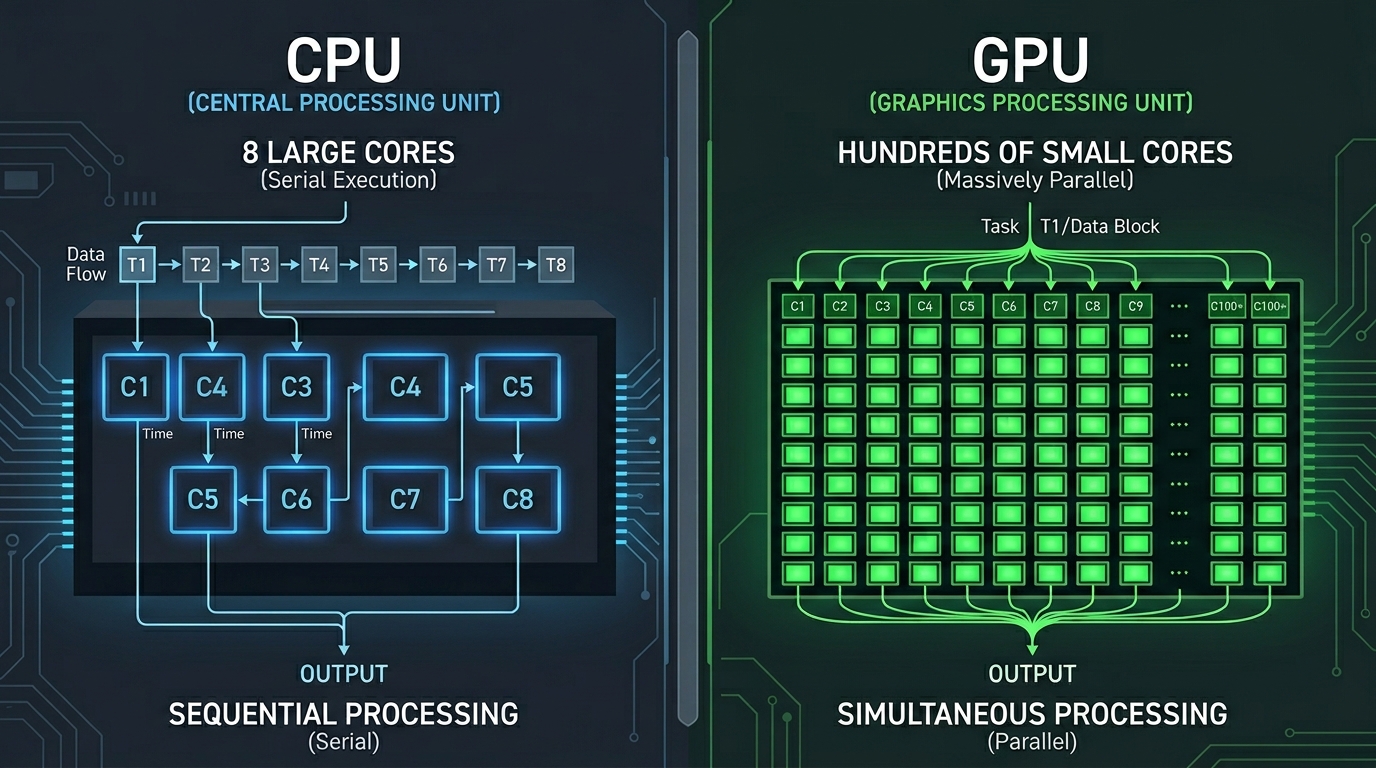
Start with the CPU. A modern CPU has somewhere between 8 and 32 cores, each highly optimized for sequential, complex tasks. It is great at handling logic-heavy, branching operations where one thing depends on another.
A GPU works differently. A modern GPU like the NVIDIA H100 has over 16,000 CUDA cores. Each individual core is much weaker than a CPU core. But when you can throw 16,000 of them at the same problem simultaneously, you get something CPUs simply cannot replicate for certain kinds of workloads.
GPU parallel computing is the practice of structuring your computation so that thousands of these smaller operations happen at the same time, in parallel, rather than one after another.
The classic example: multiplying two large matrices. A CPU does this row by row, operation by operation. A GPU can split that entire matrix multiplication across thousands of threads, each handling a tiny slice of the problem simultaneously. The result comes back orders of magnitude faster.
This is not an edge case optimization. Matrix multiplication is the core operation of neural networks. Every layer in a transformer model, every forward pass, every backward gradient update is built on it. GPU parallel computing is not a performance trick for AI workloads. It is the entire reason modern AI is possible at scale.
The Architecture That Makes It Work
You do not need to memorize hardware specs, but understanding the basic architecture will help you think more clearly when you are making infrastructure decisions.
Threads, Blocks, and Grids
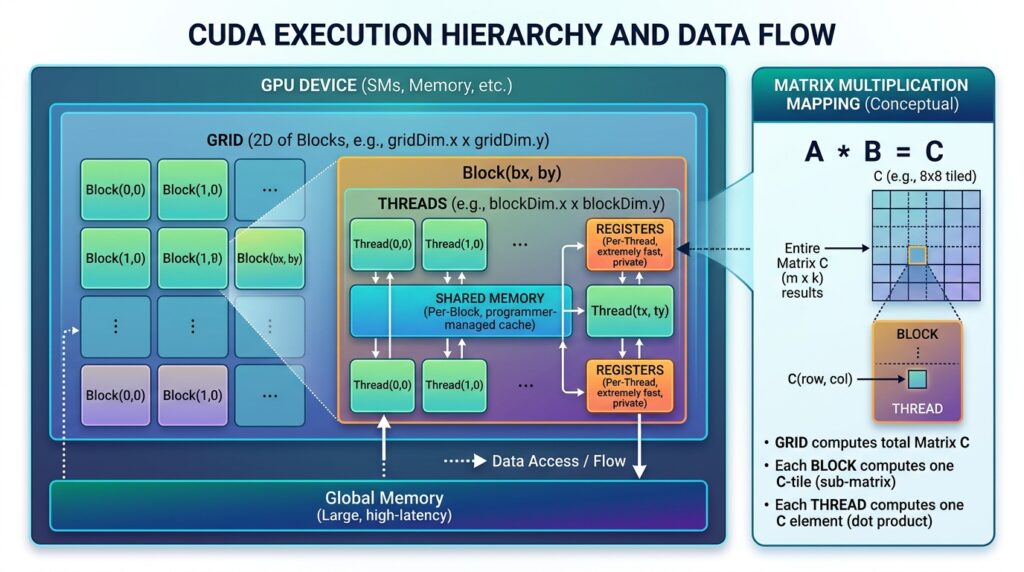
In GPU computing, work is organized into a hierarchy. At the smallest level, you have a thread, which is a single unit of execution. Threads are grouped into blocks, and blocks are organized into a grid. When you launch a GPU operation, you are effectively scheduling a grid of thousands of threads that each run the same code on different pieces of data.
This model is called SIMD (Single Instruction, Multiple Data). Every thread executes the same instruction, but each one operates on a different data element. For workloads like image processing, neural network inference, or large array operations, this is an extremely efficient pattern.
If you have ever written something like:
const result = data.map(x => x * 2);
Conceptually, you already understand SIMD. The GPU just does that .map() across thousands of elements simultaneously at the hardware level.
CUDA Cores vs Tensor Cores
When you look at NVIDIA GPU specs, you will see two things that matter: CUDA cores and Tensor Cores.
CUDA cores are general-purpose parallel processors. Tensor Cores are specialized units designed specifically for matrix operations, introduced with the Volta architecture. They can perform mixed-precision matrix math (FP16, BF16, INT8) significantly faster than standard CUDA cores, which is why they are central to deep learning workloads.
When people talk about GPUs for AI training or inference, Tensor Core throughput is often the number that matters more than raw CUDA core count. NVIDIA publishes TFLOPS ratings for Tensor Core performance, and cloud providers like AWS, Google Cloud, and Lambda Labs use these to benchmark their GPU instances.
VRAM: The Real Constraint
Here is something that trips up a lot of developers the first time they try to run a large model locally or fine-tune something on a cloud GPU.
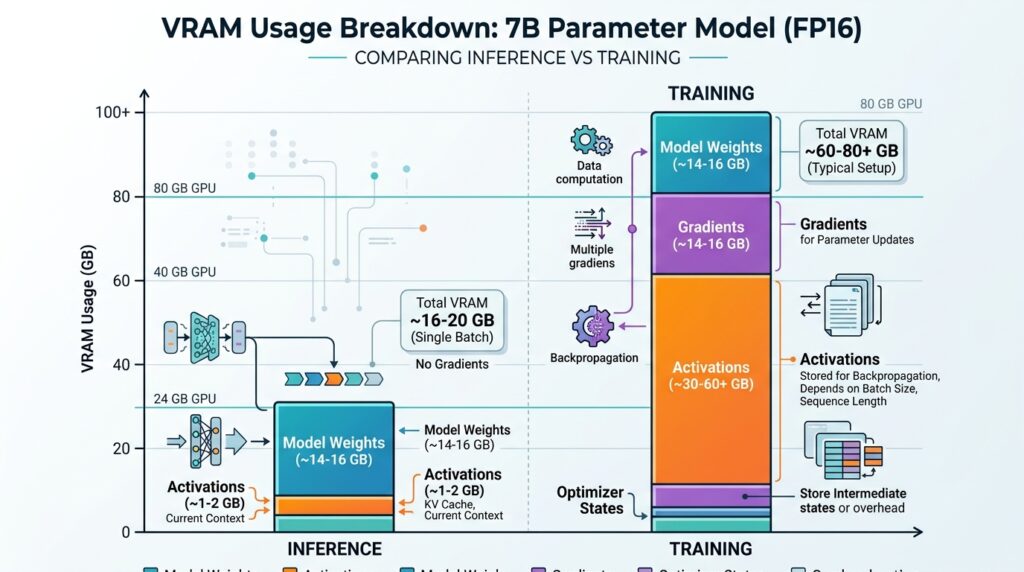
VRAM (Video RAM) is the memory on the GPU itself. It is fast, purpose-built, and completely separate from your system RAM. When you load a model onto a GPU for inference or training, the model weights, activations, and gradients all have to fit inside VRAM. If they do not, you get an out-of-memory error and nothing runs.
A 7B parameter model in 16-bit precision requires roughly 14GB of VRAM. A 70B model needs close to 140GB. This is why model quantization (running in 4-bit or 8-bit) has become standard practice for local inference. Tools like llama.cpp and bitsandbytes exist largely to help you squeeze models into the VRAM you actually have.
GPU memory bandwidth matters as much as capacity. Bandwidth determines how fast data moves between VRAM and the compute cores. An H100 has roughly 3.35 TB/s of memory bandwidth. An A10G, which is what you get on many mid-tier AWS instances, has around 600 GB/s. That difference shows up in inference latency at high throughput.
CUDA: The Programming Model Most Developers Never Write But Should Understand
CUDA (Compute Unified Device Architecture) is NVIDIA’s parallel computing platform and programming model. It is what sits between your Python or C++ code and the GPU hardware.
When you run PyTorch or TensorFlow operations on a GPU, those libraries are calling CUDA kernels underneath. You rarely write raw CUDA yourself unless you are doing custom operator development or highly optimized inference work. But understanding what CUDA is doing changes how you reason about performance.
A CUDA kernel is essentially a function that gets executed across thousands of threads simultaneously on the GPU. When PyTorch calls a matrix multiplication, it is dispatching a highly optimized CUDA kernel that maps the operation across available GPU cores.
The practical implication: operations that CUDA has an optimized kernel for (matrix multiplications, convolutions, attention mechanisms) run extremely fast. Operations that do not map well to GPU parallelism, like complex conditional logic or sequential data structures, often perform no better than CPU and can even be slower due to memory transfer overhead between CPU and GPU.
This is why the common advice for ML performance is to minimize CPU-GPU data transfers and keep as much of your computation on the GPU as possible.
GPU Parallel Computing for Web Developers: Enter WebGPU
If your background is frontend or full stack, you might be thinking GPU parallel computing sounds like something that lives entirely in the Python and C++ world. That was largely true until recently.
WebGPU is now shipping in Chrome and is in various stages of support across other browsers. It is the modern successor to WebGL, but unlike WebGL, it was explicitly designed to expose GPU compute capabilities to the browser, not just rendering.
With WebGPU, you can run compute shaders directly in the browser. This makes things like in-browser model inference, real-time image processing, and client-side AI operations genuinely viable for the first time without a server round trip.
Transformers.js from Hugging Face already uses WebGPU for acceleration when running models directly in the browser. If you are building React apps that need AI capabilities without sending data to a backend, this is the direction the ecosystem is heading.
The programming model for WebGPU compute shaders uses WGSL (WebGPU Shading Language), which has a different syntax from CUDA but follows the same fundamental parallel execution model. You define a function, you dispatch it across a grid of threads, each thread handles a slice of your data.
Common Mistakes Developers Make With GPU Workloads
Treating VRAM like regular RAM
Developers coming from web backgrounds sometimes assume you can just increase memory allocation the way you would with a Node.js process. VRAM is fixed per GPU. Planning your model size, batch size, and precision format against available VRAM before you spin up an instance will save you a lot of failed runs and wasted cloud spend.
Ignoring batching
GPUs are most efficient when processing data in batches. A GPU inference request that processes a single input at a time leaves most of the parallel compute capacity unused. Batching requests, even simple batching of 8 or 16 inputs, can improve GPU utilization dramatically and lower your cost per request.
Using GPU instances for workloads that do not need them
Not every AI task benefits from GPU compute. Embedding generation for small document sets, simple classification tasks, or lightweight API calls to hosted models do not need a GPU instance at all. Running CPU inference with a quantized model on a well-sized CPU instance is often cheaper and fast enough for many real-world use cases.
Trends and What This Means for Developers in 2026
GPU parallel computing has gone from a specialized research tool to core infrastructure for anyone building AI-powered applications. A few things worth watching:
Inference optimization is the new frontier. Training large models is still largely a research and big lab activity. But running those models efficiently at scale is now an engineering problem that product teams are dealing with directly. Tools like vLLM, TensorRT-LLM, and llama.cpp exist specifically to squeeze better throughput and latency out of GPU inference.
Multi-GPU and distributed compute are becoming more accessible. NCCL (NVIDIA Collective Communications Library) and frameworks like DeepSpeed make it possible to distribute workloads across multiple GPUs. Cloud providers now offer straightforward multi-GPU instance configs that developers can use without deep infrastructure expertise.
WebGPU will change what is possible on the frontend. Over the next 12 months, expect to see more JavaScript AI libraries move to WebGPU acceleration by default. The gap between server-side and client-side AI capability is narrowing. Frontend developers who understand GPU compute basics will be in a better position to build genuinely capable browser-based AI features.
GPU costs are a real engineering concern. A100 and H100 instance costs on major cloud providers are not trivial. Developers building production AI features need to understand the relationship between batch size, model precision, VRAM utilization, and cost per inference. This is not just a DevOps problem. It is a product architecture problem.
Conclusion
GPU parallel computing is the mechanical foundation that makes almost every AI workload you build on top of actually feasible. You do not need to write CUDA kernels or design GPU architectures to work with it effectively. But you do need to understand the basic model: thousands of threads, SIMD execution, VRAM constraints, and the difference between compute workloads that parallelize well and those that do not.
That understanding pays off the moment you are debugging a memory error on a cloud GPU instance, deciding between model quantization options, evaluating whether an inference workload actually needs a GPU, or trying to figure out why your batched requests are not getting the latency improvement you expected.
The practical next step: spin up a free Google Colab notebook with a GPU runtime, load a small model with Hugging Face Transformers, and run a batch inference test. Watch the VRAM usage. Change batch sizes. See what happens. That 20-minute experiment will give you more intuition than reading three more articles about GPU architecture.
That is how you actually learn this stuff.