
Key Takeaways
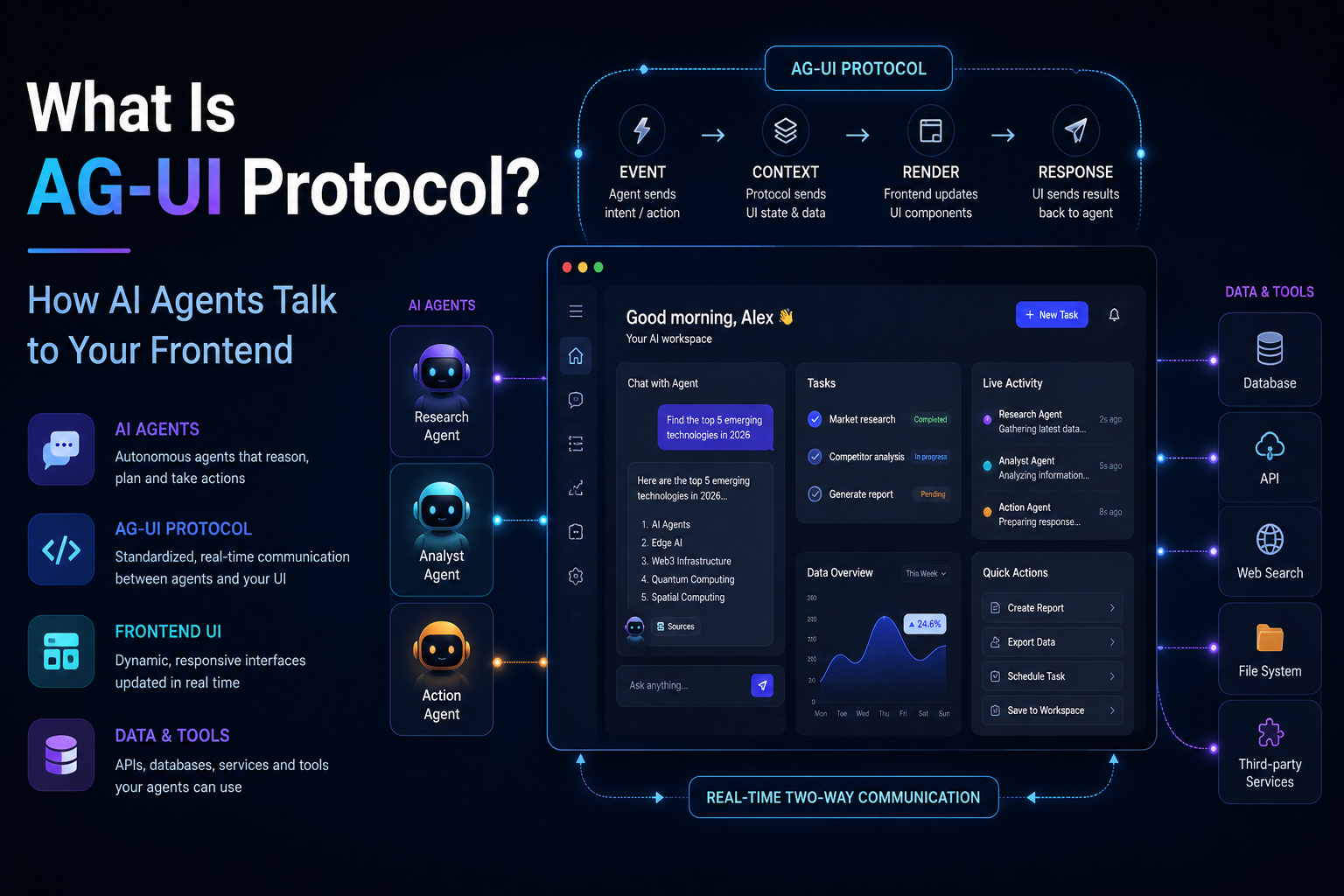
- AG-UI (Agent-User Interaction Protocol) is an open, event-based standard that defines how AI agent backends communicate with user-facing frontends, replacing the custom streaming and state-sync code most teams were writing by hand.
- AG-UI is the third leg of a protocol stack that includes MCP (agent to tool) and A2A (agent to agent). AG-UI is specifically agent to user.
- It works over Server-Sent Events or WebSocket and defines typed events like TEXT_MESSAGE_CONTENT, TOOL_CALL_START, and STATE_DELTA so any compatible frontend can render agent output without custom parsing logic.
- Major platforms are adopting it fast. AWS added AG-UI support to Bedrock Agent Core Runtime, and Microsoft added AG-UI integration guidance to its Agent Framework documentation within weeks of each other in 2026.
- You do not need to abandon your existing agent framework to use AG-UI. It already has reference support across LangGraph, CrewAI, and Google’s Agent Development Kit.
Table of Contents
Introduction
You built an AI agent. It calls tools, reasons through multi-step tasks, and produces genuinely useful output. Now you need to show that in your React app. So you write a WebSocket handler. Then you add custom event types for streaming partial text. Next, product wants a visible cue that the agent is still working before it has anything to say. Then you need to show tool calls in progress. Then state needs to sync between what the agent knows and what the UI displays. Six months later you are maintaining a fragile, hand-rolled protocol that nobody else on your team fully understands.
That is the exact problem AG-UI was built to solve, and it is happening at the same point in the agent infrastructure stack that MCP solved for tool connections back in 2024 and 2025.
If you have spent the last year reading about MCP and A2A and assumed you had the agent protocol landscape covered, AG-UI is the piece you are missing. It is moving fast, two major cloud platforms picked it up within weeks of each other in early 2026, and there is almost no developer-friendly explanation of what it actually does and why a frontend engineer should care. This article fixes that.
What Is AG-UI Protocol?
AG-UI stands for Agent-User Interaction Protocol. It was developed by CopilotKit and released in early 2025 as an open protocol for bidirectional, event-driven communication between AI agents and frontend applications.
The core idea is simple once you see it: agents are not deterministic. They are nondeterministic and can control application UI nondeterministically, and they simultaneously mix structured and unstructured input and output, such as text and voice alongside tool calls and state updates. Traditional REST request-response patterns were never designed for that. AG-UI gives you a standard contract for it instead.
AG-UI defines a contract for streaming events from an agent backend to a frontend, using Server-Sent Events or WebSocket to deliver typed messages like TEXT_MESSAGE_CONTENT, TOOL_CALL_START, and STATE_DELTA. The core value proposition is interoperability. If your agent emits AG-UI events, any AG-UI-compatible frontend can consume them, and you can swap one agent framework for another, or one frontend framework for another, without the protocol changing.
Think back to how MCP solved tool connectivity. Before MCP, every model-to-tool integration was custom. AG-UI is doing the same thing one layer up the stack, for the connection between the agent and the human watching the screen.
Where AG-UI Fits in the Agent Protocol Stack
If you already know MCP and A2A, this is the fastest way to place AG-UI. AG-UI complements the existing Model Context Protocol and Agent-to-Agent protocol. Where MCP provides agents with tools and A2A enables agent-to-agent coordination, AG-UI standardizes how agents communicate with user interfaces.
A simple mental model:
- MCP — agent talks to tools and data
- A2A — agent talks to other agents
- AG-UI — agent talks to the human, through the frontend
In a multi-agent system, one agent might delegate work to another agent through A2A, while the same agent uses AG-UI purely for display, carrying structured events and messages between the agent backend and the user interface.
None of these protocols compete with each other. They sit at different layers of the same stack, and a serious production agent application will likely use more than one. In 2023, building an AI agent meant picking a model and writing some prompts.Now it means picking your way through a whole stack of competing communication standards, each one governing a different leg of how your agent reaches tools, other agents, or the person actually using your product.
The Problem AG-UI Solves for Frontend Developers
Before a standard like this existed, every team building an agent-powered UI was reinventing the same wheel. Developers juggled REST APIs for request-response patterns, WebSockets or Server-Sent Events for streaming, custom JSON structures for tool calls, and ad-hoc approaches for dynamic UI rendering. The result was fragmented systems, brittle integrations, and zero interoperability between teams or projects.
This is not a hypothetical pain point. If you have built a chat UI that streams LLM tokens, you have already written some version of this. Now extend that to also showing tool calls as they happen, syncing application state that the agent is modifying in the background, and handling approval flows where the agent has to pause and wait for a human decision before continuing. Most teams either skip these features or build them badly under deadline pressure.
AG-UI addresses this directly with live token and event streaming for responsive multi-turn sessions, support for cancel and resume, typed attachments and real-time media including files, images, audio, and transcripts, and a typed store shared between agent and app with streamed event-sourced diffs and conflict resolution.
That last point matters more than it sounds. Reconciling what the agent just changed with what the user is doing in that exact moment is one of the genuinely thorny problems in this whole space. AG-UI gives you a structured way to handle it instead of building your own from scratch.
How AG-UI Works: Events, Transport, and Architecture
AG-UI is intentionally lightweight. At its core, it is a lightweight set of event rules that let an agent’s backend logic talk to whatever frontend is rendering it, without the two sides needing matching internal implementations. It does not replace your transport layer. It builds on top of the foundational protocols of the web, HTTP and WebSockets, as an abstraction layer designed for the agentic age, bridging the gap between traditional client-server architectures and the dynamic, stateful nature of AI agents.
Transport
AG-UI uses Server-Sent Events or WebSocket to deliver its typed messages. For most web applications, SSE is the simpler choice since it works over plain HTTP and most hosting infrastructure already supports it without extra configuration. WebSocket becomes relevant when you need true bidirectional communication, for example letting the user interrupt or redirect the agent mid-task.
Core Event Types
The protocol defines a set of typed events that cover the situations you actually run into when building agent UIs:
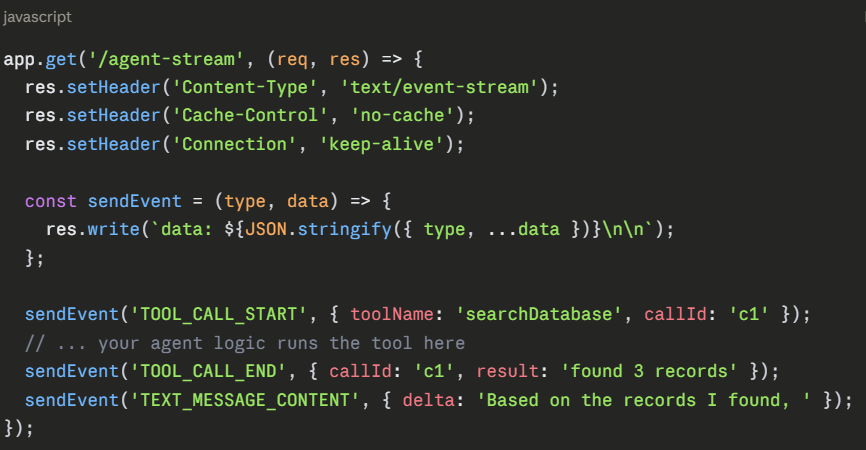
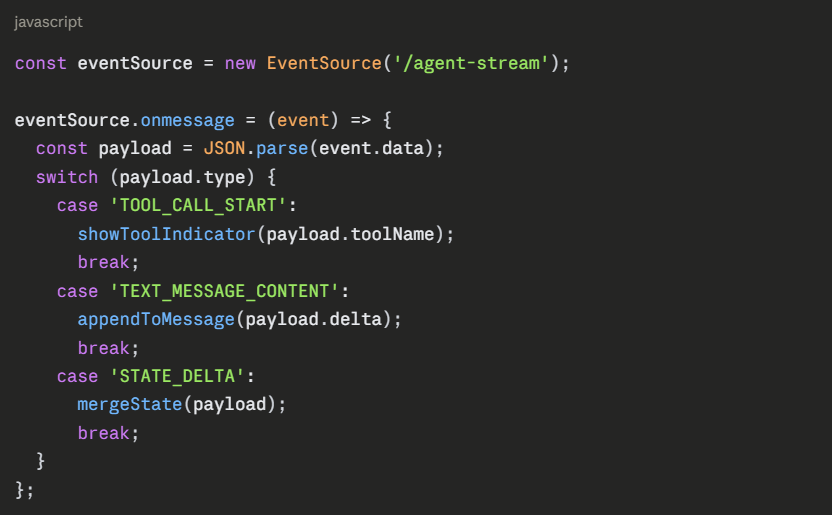
- TEXT_MESSAGE_CONTENT — streaming partial text as the agent generates it
- TOOL_CALL_START / TOOL_CALL_END — surfacing tool invocations in the UI as they happen
- STATE_DELTA — syncing changes to shared application state between agent and frontend
A minimal Node.js backend emitting these events over SSE looks like this:
On the React side, any client that understands these event types can render them without custom parsing per agent:
Reference Client Implementation
On the client side, Copilot Kit is the reference client implementation of AG-UI, though other clients exist. If you want to skip building the React rendering layer yourself, Copilot Kit gives you pre-built components that already understand the full AG-UI event vocabulary.
Framework Support: Where AG-UI Already Works
One of the reasons AG-UI is spreading fast is that it does not require you to rebuild your agent backend. On the agent side, most major agent frameworks such as LangGraph, CrewAI, Google ADK, and more are supported.
AG-UI was born from CopilotKit’s initial partnership with LangGraph and CrewAI, bringing what had been incredibly popular agent-user-interactivity infrastructure to the wider agentic ecosystem.
This matters practically. If your agent is already built on LangGraph or CrewAI, adding AG-UI support is an integration step, not an architecture rewrite. You keep your existing agent logic and gain a standardized way to expose its output to any compatible frontend.
For React and Vue developers specifically, this is the detail worth remembering: you can swap LangGraph for Strands, or React for Vue, and the protocol stays the same. That portability is the entire point.
Why Major Platforms Are Adopting AG-UI Right Now
This is the part that signals AG-UI is worth learning now rather than waiting on. In March 2026, Amazon Bedrock AgentCore Runtime added support for the AG-UI protocol, enabling developers to deploy AG-UI servers that deliver responsive, real-time agent experiences to user-facing applications, with AgentCore Runtime handling authentication, session isolation, and scaling for AG-UI workloads.
A little over a month later, Microsoft published AG-UI integration guidance as part of its Agent Framework documentation, describing it as the unified protocol that finally standardizes how agents talk to frontends, enabling streaming, declarative UI generation, state synchronization, and human-in-the-loop workflows out of the box.
Two major cloud platforms shipping AG-UI support within roughly six weeks of each other is not a coincidence.That kind of platform-level commitment marks the shift from a protocol enthusiasts test on side projects to one that ships as supported infrastructure.
For developers, the practical implication is straightforward. If you are building on Bedrock AgentCore or Microsoft’s Agent Framework, AG-UI support is already there for you to use. If you are rolling your own setup instead, you are still choosing a spec with real backing behind it, not a niche experiment that could quietly disappear before your next major release.
Common Mistakes to Avoid When Adopting AG-UI
Treating AG-UI as a replacement for MCP or A2A
AG-UI does not give your agent tools, and it does not let two agents coordinate with each other. It is specifically the agent-to-user layer. If you need tool access, you still need MCP. If you need multi-agent coordination, you still need A2A. Conflating these layers leads to architecture decisions that solve the wrong problem.
Skipping state conflict resolution
It is tempting to treat STATE_DELTA events as a one-way stream from agent to UI. In practice, users interact with the interface while the agent is still working. AG-UI’s typed store is shared between agent and app, with streamed event-sourced diffs and conflict resolution for snappy collaboration. If you build your frontend assuming the agent is the only thing modifying state, you will hit confusing bugs the first time a user clicks something mid-stream.
Over-customizing the event vocabulary early
The standard event types cover the vast majority of real use cases. Before you reach for a custom event type, check whether one of the existing typed events already fits. Wander too far from the standard event types too early and you lose the exact cross-framework compatibility you adopted the protocol to get in the first place.
Trends and What This Means for Developers
AG-UI is part of a broader consolidation happening across agent infrastructure in 2026. A2A handles agent-to-agent coordination, MCP handles tools, AG-UI handles the runtime connection to users, and newer specifications like A2UI are emerging specifically to describe declarative UI components that an agent wants the client to render.
What to watch over the next 6 to 12 months:
Cloud-native AG-UI support will keep expanding. With AWS and Microsoft both shipping native support in the same quarter, expect Google Cloud and other major platforms to follow with their own AG-UI integrations.
Generative UI is the next layer up. Protocols like A2UI are emerging as declarative UI specifications, a format for describing UI components and associated application state that an agent wants the client to render, layered on top of AG-UI’s runtime event transport. If you build on AG-UI now, you are positioned for that next layer rather than needing to retrofit it later.
Human-in-the-loop will become a baseline expectation, not a feature. As agents take on higher-stakes tasks, users and compliance teams will expect approval checkpoints built into the UI by default. AG-UI’s event model already supports this pattern. Teams that adopt it early will not have to bolt it on after the fact.
Protocol overload is real, but the layering is stabilizing. New standards have been emerging monthly, creating real confusion among teams trying to choose the right combination for their agentic systems. The good news is that the four-layer model, agent coordination through A2A, tools through MCP, runtime through AG-UI, and UI description through A2UI, is becoming the accepted reference architecture rather than a temporary state of chaos.
Conclusion
AG-UI solves a problem that every team building agent-powered products eventually runs into: the connection between your agent and your frontend was never standardized, so everyone was writing the same brittle streaming and state-sync code from scratch. Now there is a typed, event-based protocol for it, with reference implementations across the agent frameworks you are probably already using.
The mental model to keep is simple. MCP connects your agent to tools. A2A connects your agent to other agents. AG-UI connects your agent to the human watching the screen. If you are building a serious agent product in 2026, you likely need at least one of these, and increasingly all three.
The practical next step: if you are already running an agent on LangGraph or CrewAI, look at Copilot Kit’s AG-UI integration and get a basic streaming chat UI wired up with typed events instead of a custom WebSocket handler. Watch how much code you delete. That is usually the moment a protocol like this earns its place in your stack.